
Common available tools find full file matches between a scanned file and a vulnerable one. VSF allows you to go one step further and find vulnerable code snippets embedded in the scanned code even when a full file match does not exist.
How it works
VSF uses extended client functionality to perform a check for vulnerable snippets. This functionality is accessible form the Client and the Workbench. Code is compared against the FossID security volume (security volumes must be enabled).
Using the Workbench
The Workbench provides you with a testing interface to scan code and look for vulnerable code snippets. It resides within the tools section in the main menu. Each Workbench user has its own VSF scan and can upload and view code using this interface.
This functionality can be accessed in the Workbench by adding the VSF_ACCESS permission to a user. Note that this permission only grants access to the VSF interface in the Workbench. To actually get VSF results when scanning files (either using the Workbench or FossID Toolbox) a VSF enabled token must be configured. Contact FossID support or sales for any questions regarding this.
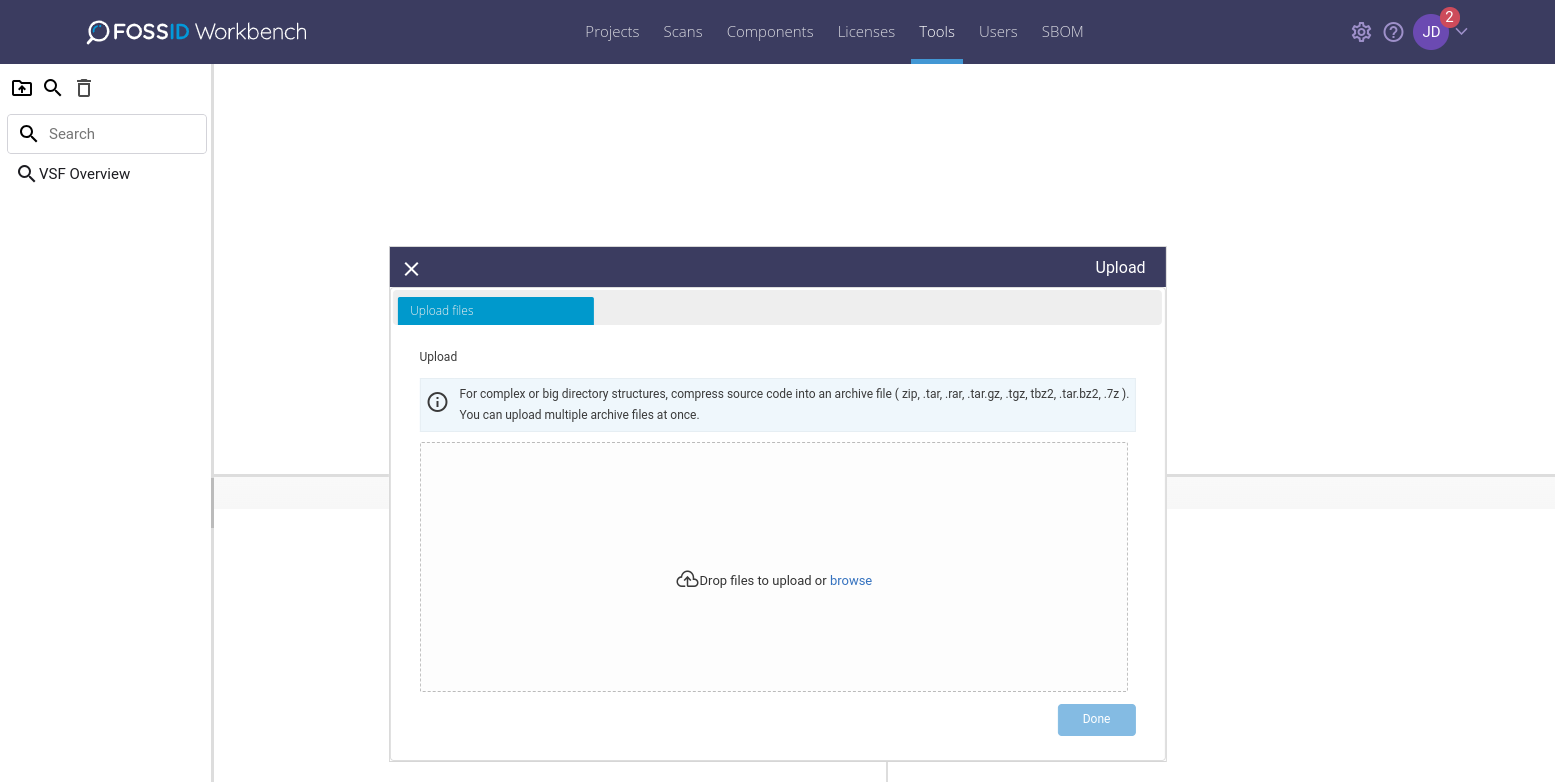
When accessing VSF in the Workbench you are presented with an initial interface where source code can be uploaded for scan.
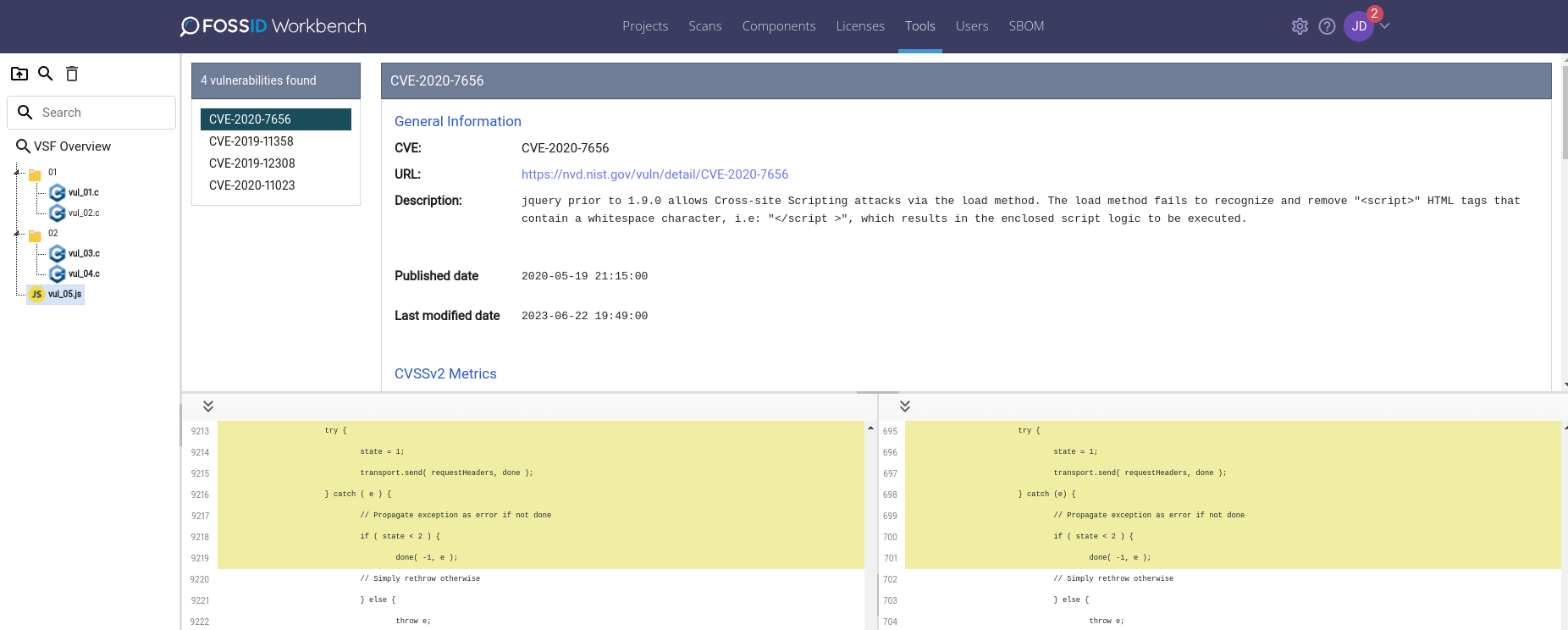
After the scan is performed you will be presented with overview information grouped by CVSS base score severity (both CVSS2 and CVSS3 are considered).
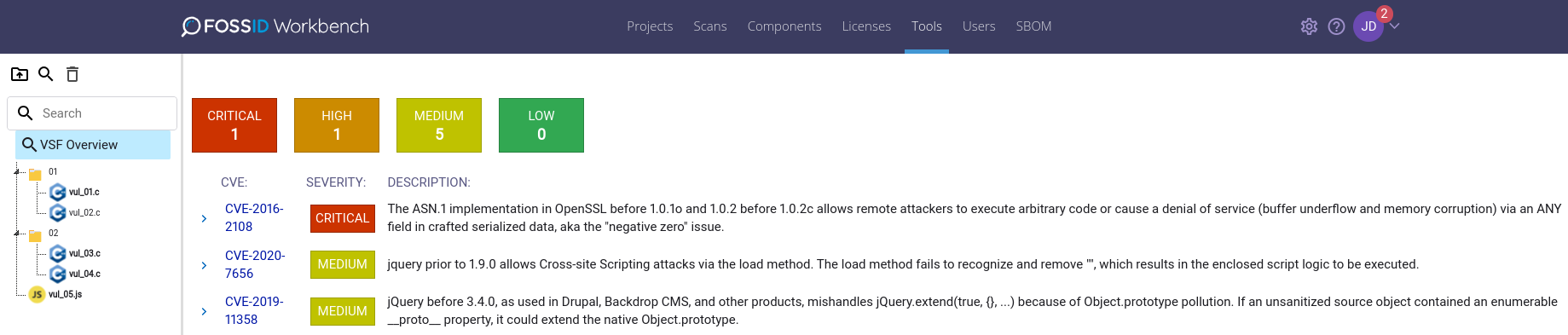
Each CVE is listed with the vulnerability description. You can see the list of files in which each vulnerability resides expanding the item.
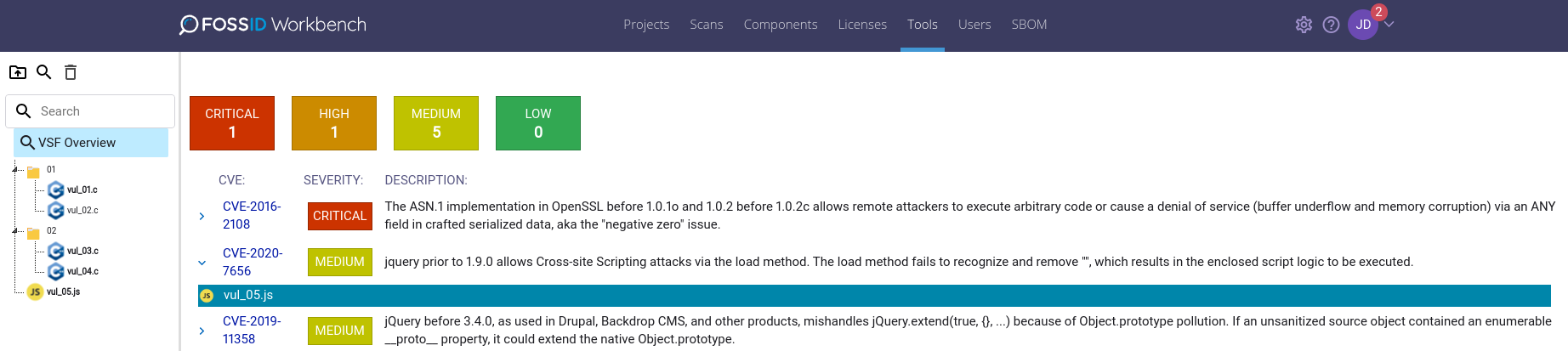
Selecting a file will give you information on any CVE found with their corresponding security metadata and will shown you the match highlighting the local code with the one found in the security volume.
Using the Client
A target code can be scanned for vulnerabilities using the filescan --mode vsf option. You will need jq installed on your system to be able to do this.
To install jq on a Debian-based system, run
sudo apt install jq
To install jq on RedHat run
sudo yum install jq
Usage example
./fossid-toolbox filescan --mode vsf '/tmp/carousel.js'
Result
The output below has been ‘prettified’ and abbreviated for readability purposes.
{
  "local_path": "/tmp/carousel.js",
  "type": "vulnerability",
  "snippet": {
    "id": "e775026cf9d8ebe2337c2f764eda4001",
    "local_size": 10,
    "local_coverage": 0.53,
    "remote_size": 10,
    "remote_coverage": 0.06,
    "remote_highlight": {
      "blocks": [
        {
          "byte_range": {
            "begin": 6200,
            "end": 6609
          },
          "char_range": {
            "begin": 6200,
            "end": 6609
          },
          "id": "ed41c5536ff6d9a346cdb0e77a824620"
        }
      ],
      "id": "e775026cf9d8ebe2337c2f764eda4001",
      "encoding": "UTF-8",
      "pfm_format": 2
    },
    "local_highlight": {
      "blocks": [
        {
          "id": "ed41c5536ff6d9a346cdb0e77a824620",
          "byte_range": {
            "begin": 142,
            "end": 551
          },
          "char_range": {
            "begin": 142,
            "end": 551
          }
        }
      ],
      "id": "e775026cf9d8ebe2337c2f764eda4001",
      "pfm_format": 2,
      "encoding": "UTF-8"
    }
  },
  "file": {
    "path": "carousel.js",
    "size": 7141,
    "encoding": "ASCII",
    "available": true,
    "id": "d83eb26368cca9aeb7aa385d00000000",
    "md5": "d83eb26368cca9aeb7aa385d00000000"
  },
  "vulnerability": {
    "id": "CVE-2016-10735",
    "url": "https://nvd.nist.gov/vuln/detail/CVE-2016-10735",
    "details": {
      "cve": {
        "data_type": "CVE",
        "data_format": "MITRE",
        "data_version": "4.0",
        "CVE_data_meta": {
          "ID": "CVE-2016-10735",
          "ASSIGNER": "cve@mitre.org"
        },
        "problemtype": {
          "problemtype_data": [
            {
              "description": [
                {
                  "lang": "en",
                  "value": "CWE-79"
                }
              ]
            }
          ]
        },
        "references": {
          "reference_data": [
            {
              "url": "https://access.redhat.com/errata/RHBA-2019:1076",
              "name": "https://access.redhat.com/errata/RHBA-2019:1076",
              "refsource": "",
              "tags": []
            },
            {
              "url": "https://github.com/twbs/bootstrap/issues/20184",
              "name": "https://github.com/twbs/bootstrap/issues/20184",
              "refsource": "",
              "tags": [
                "Exploit",
                "Issue Tracking",
                "Third Party Advisory"
              ]
            },
          ]
        },
        "description": {
          "description_data": [
            {
              "lang": "en",
              "value": "In Bootstrap 3.x before 3.4.0 and 4.x-beta before 4.0.0-beta.2, XSS is possible in the data-target attribute, a different vulnerability than CVE-2018-14041."
            },
            {
              "lang": "es",
              "value": "En las versiones de Bootstrap anteriores a la 3.4.0 y en las 4.x-beta anteriores a la 4.0.0-beta.2, Cross-Site Scripting (XSS) es posible en el atributo \"data-target\". Se trata de una vulnerabilidad diferente de CVE-2018-14041."
            }
          ]
        }
      },
      "configurations": {
        "CVE_data_version": "4.0",
        "nodes": [
          {
            "operator": "OR",
            "children": [],
            "cpe_match": [
              {
                "vulnerable": true,
                "cpe23Uri": "cpe:2.3:a:getbootstrap:bootstrap:*:*:*:*:*:*:*:*",
                "cpe_name": []
              },
              {
                "vulnerable": true,
                "cpe23Uri": "cpe:2.3:a:getbootstrap:bootstrap:4.0.0:beta:*:*:*:*:*:*",
                "cpe_name": []
              }
            ]
          }
        ]
      },
      "impact": {
        "baseMetricV3": {
          "cvssV3": {
            "version": "3.0",
            "vectorString": "CVSS:3.0/AV:N/AC:L/PR:N/UI:R/S:C/C:L/I:L/A:N",
            "attackVector": "NETWORK",
            "attackComplexity": "LOW",
            "privilegesRequired": "NONE",
            "userInteraction": "REQUIRED",
            "scope": "CHANGED",
            "confidentialityImpact": "LOW",
            "integrityImpact": "LOW",
            "availabilityImpact": "NONE",
            "baseScore": 6.1,
            "baseSeverity": "MEDIUM"
          },
          "exploitabilityScore": 2.8,
          "impactScore": 2.7
        },
        "baseMetricV2": {
          "cvssV2": {
            "version": "2.0",
            "vectorString": "AV:N/AC:M/Au:N/C:N/I:P/A:N",
            "accessVector": "NETWORK",
            "accessComplexity": "MEDIUM",
            "authentication": "NONE",
            "confidentialityImpact": "NONE",
            "integrityImpact": "PARTIAL",
            "availabilityImpact": "NONE",
            "baseScore": 4.3
          },
          "severity": "MEDIUM",
          "exploitabilityScore": 8.6,
          "impactScore": 2.9,
          "acInsufInfo": false,
          "obtainAllPrivilege": false,
          "obtainUserPrivilege": false,
          "obtainOtherPrivilege": false,
          "userInteractionRequired": true
        }
      },
      "publishedDate": "2019-01-09T05:29Z",
      "lastModifiedDate": "2024-11-21T02:44Z"
    }
  },
  "id": "815f300a66320fa8"
}
Obtaining the snippet and highlighting
You can grab the local highlight or remote highlight data from the match using the following commands:
# For the local highlight:
fossid-toolbox filescan --mode vsf '/tmp/carousel.js' | head -1 | jq .snippet.local_highlight -rc

{"blocks":[{"id":"ed41c5536ff6d9a346cdb0e77a824620","byte_range":{"begin":142,"end":551},"char_range":{"begin":142,"end":551}}],"id":"e775026cf9d8ebe2337c2f764eda4001","pfm_format":2,"encoding":"UTF-8"}

# For the remote highlight:
fossid-toolbox filescan --mode vsf '/tmp/carousel.js' | head -1 | jq .snippet.remote_highlight -rc

{"blocks":[{"byte_range":{"begin":6200,"end":6609},"char_range":{"begin":6200,"end":6609},"id":"ed41c5536ff6d9a346cdb0e77a824620"}],"id":"e775026cf9d8ebe2337c2f764eda4001","encoding":"UTF-8","pfm_format":2}
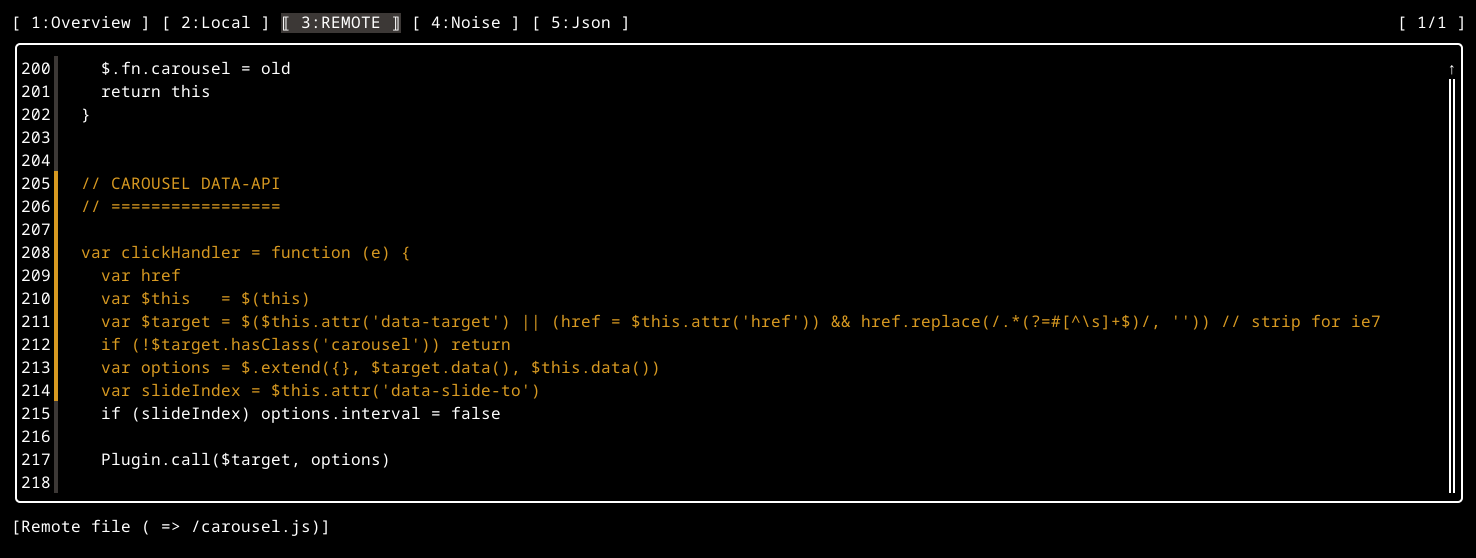
FossID Toolbox processes the highlighting data directly in the toolbox interface coloring the matching snippets. This can be reviewed using the option filescan --view together with --mode vsf for vulnerabilities like:
fossid-toolbox filescan --view --mode vsf '/tmp/carousel.js'